
Support
Cargo Tilt is made by a very small team. There is no ticket system and no bot — an e-mail reaches a person.
Contact
info@cargotilt.app
The same address as in App Store Connect, Google Play Console and the
privacy policy.
We are one or two people in one time zone, so please allow a few working days for a reply.
Reporting a bug
A report we can act on usually has all of this in it. If you only have some of it, send it anyway — a partial report still helps.
- What happened, and what you expected instead. One or two sentences is plenty.
- The level number, if it happened in a level. It is shown at the top of the screen while you play.
- What you did just before it happened — the last move or two. If you can make it happen again, say what you do to trigger it.
- Your device and OS version — for example “iPhone 13, iOS 18.4” or “Samsung Galaxy A54, Android 15”.
- The game version, from Settings → About.
- A screenshot or a short screen recording, if the problem is something you can see.
- Your app-instance ID, from Settings → About — only needed for a data request (below). It is not needed for a bug report.
Purchases and restoring
Purchases are handled by Apple and Google, not by us. Refunds go through them — the terms of use say how. If a purchase you made is not showing up, use Restore purchases in the in-game shop first, then write to us with the store receipt if it still does not appear.
Deleting your data
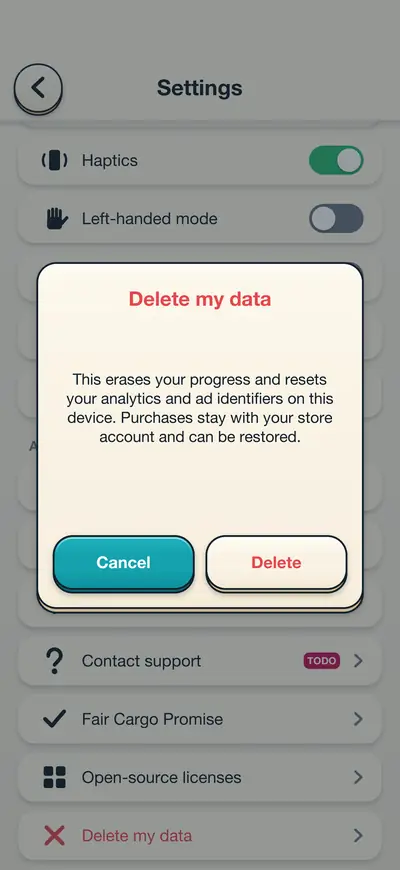
You can do this yourself, inside the game, without writing to anybody:
Settings → Delete my data
This erases your local progress and resets the analytics and advertising
identifiers the game uses on that device. Purchases stay with your store account
and can be restored. Uninstalling the game also removes everything stored on the
device.
If you want data deleted from our providers as well, the privacy policy explains the request: e-mail us with your app-instance ID from Settings → About, and we ask our providers to delete it within 30 days. The same section lists your rights under GDPR, UK GDPR and KVKK.
Accessibility
Settings has colour-blind friendly shapes, a high-contrast mode, a left-handed mode, reduced motion, and haptics you can switch off. If something in the game is hard to use, that is a bug worth reporting — please tell us which setting you use and what got in the way.